
Import Excel or CSV into a database table
Map an Excel sheet or CSV into an existing table, decide how matching keys should behave and validate the input before applying it. Start with a small representative file and a recoverable target.
Download the correct productOn this page
01 / RESOURCES
1. Prepare the table and file
Use a target account with the required write permissions and confirm the table definition. Keep a recoverable copy of data that may change. Inspect the file for converted identifiers, date ambiguity, decimal formats and empty fields before opening the import.
02 / RESOURCES
Make the mapping visible.
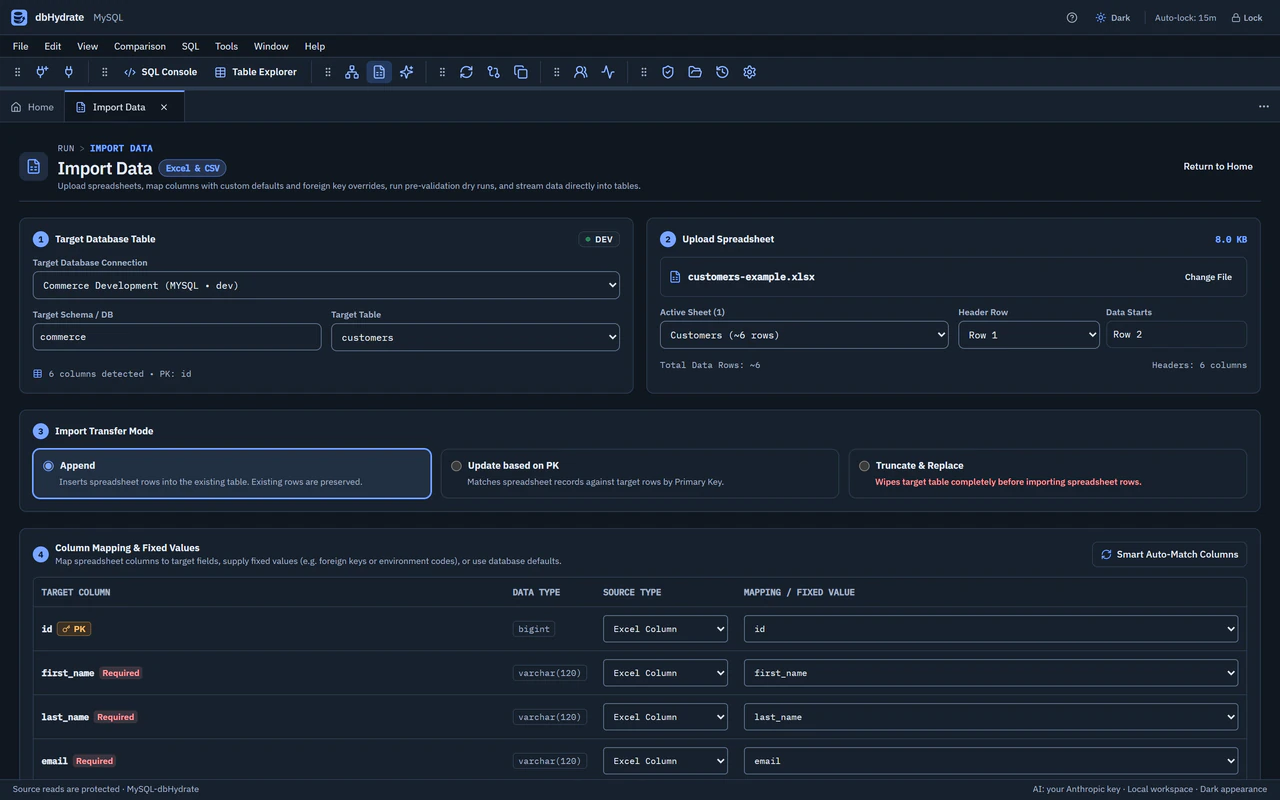
Map file columns to the destination table before importing.
03 / RESOURCES
2. Select and map the input
Choose the workbook sheet or CSV and map each incoming field to the intended database column. Supply fixed values only where appropriate. Inspect a representative record so a similarly named field does not silently map to the wrong meaning.
04 / RESOURCES
3. Decide how existing records behave
Choose append when input records should all be new. For a supported primary-key update, confirm the key fields, choose which columns to keep or replace and decide whether missing records should be inserted. Record those choices before applying a correction to existing data.
05 / RESOURCES
4. Resolve validation problems
Run pre-validation and investigate incompatible values or mappings. Correct the file or configuration and validate again. Database constraints still apply, and a file that passes type checks can still contain the wrong business value.
06 / RESOURCES
5. Import and verify the result
Confirm the target environment and execute the reviewed import. Check counts and sample changed records, including fields that were meant to remain untouched. For an update, verify an existing key and the behavior of a missing key.
07 / RESOURCES
6. Handle an unexpected outcome
Stop before repeating the same import blindly. Compare the observed state with the intended append or update behavior and determine what already changed. Correct the specific input or use your recovery procedure, then rerun only after the scope is clear.
08 / RESOURCES
Example: verify a small Excel or CSV import
Use a disposable development table named demo_import_customers with customer_id, email and country_code columns. Give customer_id a primary key and matching column types before importing. The CSV below is an illustrative two-row input; it is not production customer data.
Map the three fields explicitly. Use append only when these keys do not already exist; review the primary-key update setting if the task is to update existing rows. After a successful import, run the read-only check below. For this example it should return imported_rows = 2.
The verification query works in PostgreSQL, MySQL and SQL Server. Select the intended database and schema first. A count checks row presence, so inspect the actual values too; it does not prove that every transformation was correct.
customer_id,email,country_code
401,[email protected],US
402,[email protected],CASELECT COUNT(*) AS imported_rows
FROM demo_import_customers
WHERE customer_id IN (401, 402);Questions & answers
Can I preserve existing notes while updating a status?
Yes, where the primary-key update workflow supports the table. Set the status field to update and the notes field to keep, then verify both after import.
Does validation make an untrusted workbook safe?
No. Validation checks proposed data and mappings. You still need to trust the file source and verify that the records are appropriate for the destination.