
How to create an ER diagram from a database
Create an ER diagram from an existing database around the tables your team needs to understand. Share the structure in a format that suits the discussion.
Download the correct productOn this page
01 / RESOURCES
1. Choose a useful scope
Connect to the database and choose the tables involved in the workflow you are explaining. Start with a focused area such as customers, orders and order lines. dbHydrate can include related tables one or two steps away; inspect that expansion before adding more detail.
02 / RESOURCES
Follow the relationships.
Read the relationships between customers, orders, order items and products.
03 / RESOURCES
2. Check the relationships
Review the displayed primary and foreign keys, including composite keys and self-references. The diagram reflects declared relationships; application conventions without foreign keys may need explanation. Choose a display that shows table names, keys or all columns according to the audience.
04 / RESOURCES
3. Arrange the explanation
Use automatic arrangement as a starting point, then move related tables together. Add groups and notes for ownership, workflow or questions that need follow-up. Zoom, fit and the minimap help with larger diagrams, but a smaller diagram is often easier to review. A diagram supports up to 500 tables.
05 / RESOURCES
4. Keep an editable copy
Save a .dbhydrate-erd file when another dbHydrate user needs to continue the work. It carries structure, layout, notes, groups and pending design changes. It does not include connection details, credentials or table rows. Schema names and notes may still be confidential.
06 / RESOURCES
5. Export for the reader
Use PNG or SVG for documentation, PDF for print or review, and Mermaid or DBML where a text representation fits the team's workflow. Check labels and page breaks at the intended viewing size. Exported SQL covers pending design changes rather than a complete database dump.
07 / RESOURCES
6. Refresh and review separately
Refresh the diagram when the connected schema changes, then check relationships and notes again. Moving tables or editing notes does not change the database. Supported design changes go through Schema Sync review; existing table or column renames and primary-key changes are outside these design controls.
08 / RESOURCES
Example: read a customer and order ER diagram
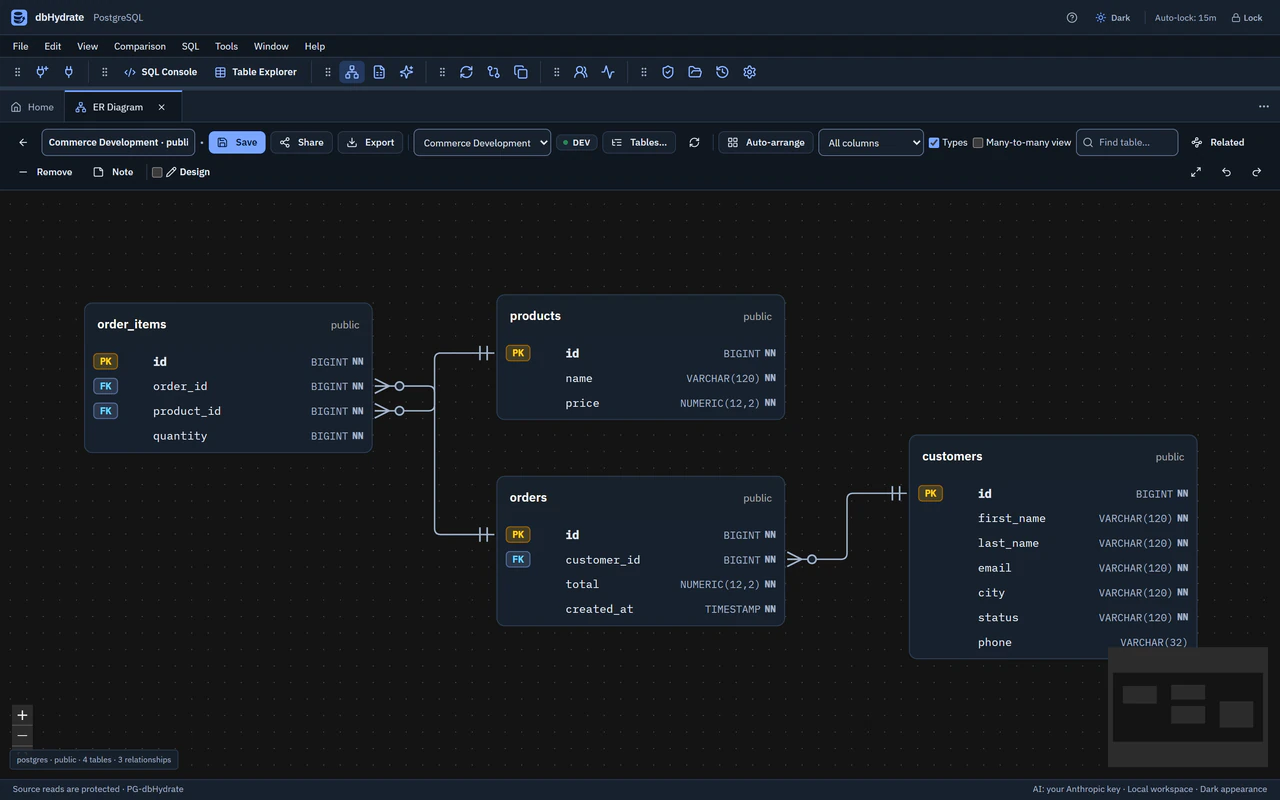
Start with customers, orders and order_items rather than the entire database. Inspect the primary and foreign keys before interpreting the diagram. A foreign key from orders.customer_id to customers.customer_id usually represents many orders belonging to one customer; uniqueness and nullability affect the allowed cardinality.
A diagram can show declared database relationships. If the application links records without a declared foreign key, document that convention separately instead of assuming the diagram discovered it.
| Relationship | What to inspect |
|---|---|
| Customers to orders | The orders.customer_id foreign key, nullability and any uniqueness constraint. |
| Orders to order items | The order_items.order_id foreign key and the child table primary key. |
| Many-to-many designs | The join table and its two foreign keys; inspect its uniqueness rules as well. |
Questions & answers
Can someone open the diagram without my database connection?
An editable .dbhydrate-erd file carries the diagram's structure and layout without the original connection details. Image and PDF exports can be read without dbHydrate.
Does the diagram show every relationship used by my application?
It shows the relationships represented in the schema. Document conventions or application-only links separately.