
A developer asks an assistant to explain a query. The answer is clear, the SQL looks plausible, and the next question is still waiting: does it behave correctly against this database?
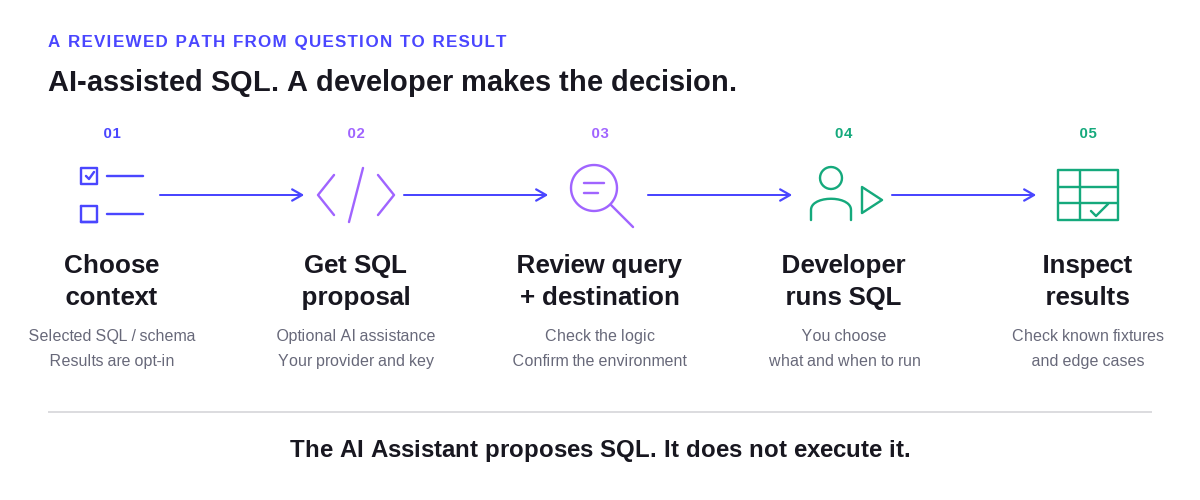
That question shapes how we think about AI in dbHydrate. The product brings SQL editing, table inspection and database change workflows into one workspace, with an optional AI Assistant beside the editor. You choose the context to send, review its proposal and decide what to run. The Assistant does not execute SQL.
For developers and DevOps engineers, that means AI can help with a specific piece of an investigation while connection details, database records and change review remain part of the job. Here is what that looks like in practice, and where the limits belong.
What current research tells us about AI-assisted development
Stack Overflow's 2026 Developer Survey, published on October 6, found that 48% of respondents trusted AI when they could easily validate its answers. That is a useful requirement for a database tool: give the person reviewing a suggestion a practical way to check it. The survey describes respondents' views; it does not establish how much faster a particular team will work. Stack Overflow, 2026 AI results.
Measured outcomes also depend on the setting. METR's July 2025 randomized study involved 16 experienced open-source developers completing 246 tasks in familiar repositories. Allowing early-2025 AI tools increased completion time by 19% in that experiment. In February 2026, METR explained that its follow-up had serious selection and measurement problems, making the newer results an unreliable estimate of current productivity effects. Neither finding is a dbHydrate benchmark or a reliable forecast for every developer. METR's original study, February 2026 update.
DORA's 2025 research associated AI adoption with higher delivery throughput and product performance, alongside a negative relationship with delivery stability. Its practical implication for database work is worth considering: generating more proposed changes increases the importance of the review and testing around them. That last observation is our interpretation of the research, not a measured dbHydrate outcome. DORA report announcement, September 23, 2025.
Start with the context the question needs
An assistant cannot infer your team's meaning of an active customer, an eligible refund or a successful deployment from column names alone. Before requesting SQL, state the business rule and check the schema it depends on.
In dbHydrate, a request can include your question, selected SQL or editor text, and a schema summary. Relevant errors can provide more detail. Query results require an explicit choice to include them; production result sharing is disabled unless permitted in Settings. You use your own supported provider key, and provider usage is billed through your provider account.
A useful request might be: "Explain whether this query keeps test customers that have no paid orders during October. Treat the reporting window as UTC. Do not change the query yet." That gives the review a clear target. A broad request such as "optimize this database" leaves too much unspecified.
Context also has a disclosure cost. Check SQL literals, comments, schema names and error messages before sending them. A request without result rows can still contain information your organization considers sensitive. Your own API key does not make the selected provider part of your local computer.
Stack Overflow's 2026 knowledge results reinforce the importance of context: respondents ranked project requirements and code or documentation as their leading inputs for AI work. Those preferences support a task-specific approach, but they do not show that adding every available record improves an answer. Stack Overflow, 2026 knowledge results.
A staging investigation, from proposal to checked result
Consider this hypothetical example. A developer is investigating a failing report test after refreshing a PostgreSQL staging database. The test needs several sample customers, including one with no paid orders in October. The first report query omits that customer entirely.
The developer opens the SQL Console, confirms the staging connection and asks the Assistant to explain the join. The selected context contains the query and relevant schema details. Result sharing stays off. An explanation can help identify a filter on the orders table that removes customers without matching orders, but the developer must compare that explanation with the actual SQL.
For this fictional schema, the intended query could look like this:
SELECT
    c.id AS customer_id,
    COUNT(o.id) AS paid_order_count
FROM customers AS c
LEFT JOIN orders AS o
    ON o.customer_id = c.id
   AND o.status = 'paid'
   AND o.created_at >= TIMESTAMPTZ '2026-10-01 00:00:00+00'
   AND o.created_at <  TIMESTAMPTZ '2026-11-01 00:00:00+00'
WHERE c.is_test_customer = TRUE
GROUP BY c.id
ORDER BY c.id;
This PostgreSQL example assumes that orders.id is non-null, created_at is a timestamp with time zone, and the test flag identifies the intended customers. The order filters belong in the join condition so a selected customer survives when no order matches. Counting o.id then yields zero for that customer; COUNT(*) would count the unmatched joined row. PostgreSQL documents both the outer-join behavior and the difference between these counts. Table expressions, aggregate functions.
The developer reviews the proposal, puts the chosen SQL into the editor and runs it deliberately against the test environment. The result should be checked against known fixtures: a customer with no orders, one with an unpaid order, and paid orders on either side of the time boundary. The UTC window and the meaning of paid also need to match the application's reporting rules.
If the fixture data is missing, changing the query will not repair the test. The developer can inspect the records and relationships, then revisit the same-engine data-copy selection. A useful assistant explanation helps narrow the investigation; the database and test expectations establish whether the answer is right.
Keep database changes reviewable
The same distinction matters when a task moves from reading data to changing structure. A generated ALTER TABLE statement may be valid SQL and still be inappropriate for the destination's current state.
Schema Sync compares environments of the same database engine and provides generated SQL for review. Developers should inspect the selected differences, warnings and safeguards available for that engine before applying a change. A rehearsal's meaning depends on the operation and database. A schema snapshot should not be treated as a complete data backup.
For DevOps engineers preparing a staging refresh, data copy and data comparison address separate questions: which records should move, and what differs between the selected environments? Check keys, related rows and destination behavior before proceeding. PostgreSQL, MySQL and SQL Server have different capabilities and transaction behavior, so an apparently similar operation needs engine-specific review. These workflows do not imply cross-engine migration.
Give security claims a precise boundary
The local vault protects supported saved records after setup, including supported profiles, run history, SQL history and AI records. Connection secret fields are encrypted, while identifying metadata such as connection names and hosts remains readable. This is a defined protection boundary, not a whole-device encryption claim.
Exported files sit outside that boundary. If you save query results to a shared folder or attach a diagnostic export to a ticket, review the file and its destination separately. Optional AI context is another disclosure decision, governed by the selected provider and your organization's policy.
Masking can replace selected values during a data-refresh workflow. It does not guarantee anonymization: remaining fields or relationships may still identify someone. Decide which fields require treatment and inspect the resulting dataset before handing it to another person or system.
For an evaluation, configure restricted database accounts and verify transport settings alongside the vault. An assistant's explanation cannot grant database permission, determine your retention policy or establish that a dataset is safe to distribute.
Evaluate the work you actually do
The SQL Console, table tools, schema review and supported data workflows work without an AI provider. A team can assess those tools first, then evaluate the Assistant separately with approved context and a provider account it is allowed to use.
Choose a few representative tasks and define an acceptable result before starting. Record time spent checking and correcting suggestions as well as drafting them. For a query investigation, correctness might mean passing known fixtures and explaining the edge cases. For a schema change, it includes reviewing the destination and the applicable safeguards.
That gives the team evidence for its own decision. dbHydrate's contribution is a workspace in which a proposed answer can be examined alongside the database work it concerns. Whether that saves time depends on the task, the person and the review the result requires.
Frequently asked questions
Does dbHydrate's AI Assistant run SQL automatically?
No. It proposes SQL and explanations. You can copy or insert the response into the editor, review it and choose whether to run it. The Assistant itself does not execute database statements.
Can I use dbHydrate without sending query results to AI?
Yes. Result rows require an explicit inclusion choice. You can use the Assistant with appropriate selected SQL or schema context, or use the database tools with AI disabled. Review every selected context item for sensitive information.
Does dbHydrate guarantee that AI-assisted database work is faster or safer?
No measured productivity or incident-reduction guarantee is made here. Evaluate representative tasks against known results, include review effort, and apply the permissions and change controls required for your database environment.