
A release can reach staging with the right application code and the wrong database definition. Perhaps a column was added manually, a default changed during debugging, or an index never made it into the deployment script. Comparing the two environments gives you a concrete list to investigate.
Start by deciding what staging should match. Development may contain an unfinished experiment, and staging may need different owners or privileges. Selecting development as the source does not make every difference suitable for deployment.
Use this procedure with two PostgreSQL environments you are authorized to inspect. Begin with restricted accounts and a recoverable target. dbHydrate compares environments of the same engine; this workflow does not convert a PostgreSQL schema into another database engine.
Identify the databases and comparison scope
Confirm the server, database and schema on both connections. A familiar connection label is helpful, but check the actual destination before generating a change plan. Run this read-only query separately on each connection:
SELECT current_database() AS database_name,
       current_user AS current_role,
       current_schema() AS current_schema;
Choose the schemas and object types relevant to the release. Include a reason for excluding objects. If a permission problem hides a definition, resolve that visibility problem before calling the environments equivalent.
A small application change can depend on several objects. A table column, its default, an index and a view may all belong to one release task. Review the supported object coverage in the tool you are using instead of assuming that a table list represents the whole database.
Use a column inventory to investigate a difference
For a first inspection, this read-only query lists column definitions visible to the connected account. Replace the illustrative public.orders reference with the table you need:
SELECT table_schema, table_name, column_name,
       data_type, is_nullable, column_default
FROM information_schema.columns
WHERE table_schema = 'public'
  AND table_name = 'orders'
ORDER BY ordinal_position;
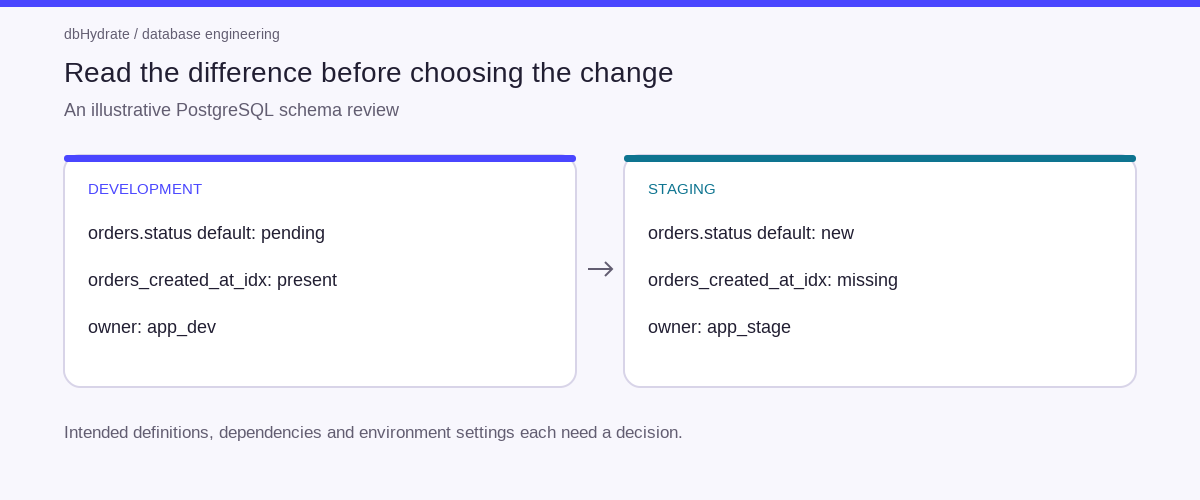
Suppose development has a status default of pending while staging has new. Check which value the application expects and whether existing rows need treatment. A default affects future inserts that use it; changing the definition does not, by itself, establish the intended value of every existing record.
This inventory is useful evidence, but it is incomplete as a schema comparison. It does not inventory indexes, foreign keys, policies, routines or every detail of a type definition. PostgreSQL's information schema documentation explains the column fields and visibility rules.
Separate intended changes from environmental differences
Review each selected difference with its deployment purpose in mind. An extra development-only table may belong to an experiment. An unexpected staging object may support a diagnostic process. Neither should disappear simply because it appears on one side of a comparison.
For each proposed change, record the object, intended definition, dependent objects and the check that will establish success. Ask whether the operation changes data, requires locks or affects an application version that is still running. Agree on recovery before execution.
Text comparisons of schema-only dumps can provide another view. PostgreSQL documents what pg_dump includes and excludes. Keep dump-tool versions and options in the review notes, and inspect differences in ownership or formatting before treating them as application changes.
Review the SQL, then compare again
In dbHydrate, use Schema Sync to inspect the selected differences and generated SQL. Check the destination, preflight findings and reported rehearsal mode. A successful rehearsal is evidence about that run and its supported scope; it does not establish that a busy production workload will experience the same timing.
After applying an approved change through your team's process, compare the relevant objects again. Run the application check that motivated the work, such as inserting a test order in a disposable environment and checking its status. Investigate any difference that remains rather than repeatedly applying the same script.
For the workspace procedure, use the schema review guide. The PostgreSQL edition page describes the product context. Keep the reviewed SQL and verification notes with the release so another developer can see why the change was made.