dbHydrate is a database IDE for developers. Write SQL, explore relationships, edit records and import data. Compare environments, rehearse schema changes and refresh masked test data without leaving your desktop workspace.
Query, explore, edit, import, compare and administer in one desktop workspace. Open a workflow to see what’s included.
01Query & exploreFollow a question from SQL to the rows and relationships behind it.+
SQL console
Write SQL in a highlighted editor, work in multiple query tabs, run queries or scripts, and inspect execution time and returned rows. Read-only mode is the default; writes require an explicit switch.
Query history & result export
Revisit recent queries and export query results as CSV or JSON.
Table browser & structure inspector
Filter, sort and page through records. Inspect columns, keys, indexes and generated table DDL alongside your data.
ER diagrams & related records
Explore table relationships in an ER diagram, inspect referenced parents and drill into matching child records.
02Edit & importMake everyday data work part of the same workspace.+
Data editing & bulk updates
Insert, update and delete table records; update a column across selected rows. Saved read-only settings and database permissions still apply.
Excel & CSV import
Choose a workbook sheet or CSV, map columns, supply fixed values and validate rows before importing. Append or match primary keys, with per-column keep/update choices and an option to insert missing rows.
Synthetic test data
Generate mock values for supported column types and insert test rows into the selected table. Review target constraints and relationships before seeding.
Table export
Export the loaded table rows as CSV or JSON for analysis and handoffs. Exported files need the same care as the original data.
03Compare & syncUnderstand the difference between environments before changing your target.+
Schema comparison & selective sync
Compare live object definitions, choose the differences to include, and inspect generated SQL and dependency order before applying a plan.
Row-level data comparison
Compare a bounded set of rows in two tables using common primary keys. Inspect identical, changed and missing records, then review generated sync SQL. This is a selected-table comparison, not exhaustive whole-database reconciliation.
Dry runs & reviewed recovery
Rehearse schema plans using the selected engine’s approach. Review warnings, snapshots and generated rollback SQL; a schema snapshot is not a data backup.
Environment protection
Keep source, target and environment visible. High-protection schema targets require a passing dry run, snapshot and typed target confirmation. Target drift requires a fresh comparison.
04Copy & maskBuild useful test datasets with control over rows, relationships and values.+
Selected & related data copy
Choose tables, WHERE filters, primary-key rows and row limits. Include related records and review dependency order. Use replace, append or primary-key update workflows.
Reusable masking rules & overrides
Review sensitive columns, try rules in the masking playground, and reuse patterns and deterministic seeds. Apply fixed column overrides after masking. Transformation runs in local memory.
Copy preflight & verification
Review constraints, triggers, identity/generated columns and sequence handling. Supported replace copies report checksums; masked, overridden and generated columns are excluded. Append/upsert and triggers kept on have verification limits.
05Monitor & administerInspect activity and manage supported accounts and permissions.+
Database activity & locks
Inspect active processes, lock information and table disk usage. Refresh activity and, with appropriate permissions and confirmation, terminate a selected process.
Users, roles & permissions
Inspect and create supported accounts, update role membership and direct grants, reset supported passwords or disable login. Review account changes and SQL before applying. Controls differ by engine and require administrator privileges.
06Workspace & automateKeep your connections, repeatable workflows and history close to your work.+
Saved connections & SSH tunnels
Test and organize connections, discover databases and schemas, or enter them manually. Configure supported TLS and SSH options and label environment protection.
Multiple workspace tabs
Keep queries, tables and other tools open together. Switch tasks without losing each tab’s working state.
Saved profiles & CLI automation
Reuse schema-sync and data-copy profiles. Use the dbHydrate CLI for repeatable compare, plan and apply workflows with environment safeguards.
Local run history
Revisit completed, failed and partial runs with their recorded SQL and results. Inspect recovery information before deciding what to do next.
Encrypted workspace & appearance
Protect local connections and workspace files with your master password, use auto-lock, and choose Light, Dark or System appearance. Database work connects directly to your servers.
Explore actual workspace views. Available controls and objects depend on your engine and database permissions.
dbHydrate workspace · select to enlargeDesign preview · PostgreSQL example data
Write queries and inspect results in the same focused workspace.
CHOOSE YOUR DATABASE
Three products, built for their engines.
Pick PostgreSQL, MySQL or Microsoft SQL Server to see the version support, recovery approach, and workflow for your product.
PostgreSQL 13–17
PG-dbHydrate
A PostgreSQL database IDE for SQL, editable tables, ER diagrams and everyday development—with reviewed schema sync and masked data refresh in the same workspace.
A Microsoft SQL Server database IDE for T-SQL, data editing, activity inspection and users & access—with reviewed schema changes and selected data copy.
Each product is licensed separately. Prices and device allowances follow the selected product and term.
DIRECT ANSWERS
Database IDE questions.
What is a database IDE?+
A database IDE brings query writing, data exploration, editing and database tools into one workspace. dbHydrate combines those everyday tools with reviewed schema changes, selected data copy, masking and repeatable profiles.
What can I do in dbHydrate beyond schema migration?+
Run SQL, edit records and bulk values, import Excel or CSV, inspect structure and ER diagrams, follow related records, generate synthetic rows, compare table data, inspect activity and manage supported users, roles and grants.
Can I compare every row in a database automatically?+
The data-comparison tool compares a bounded set of records from selected tables with common primary keys. Supported replace copies also report checksums with exclusions and limits. Neither is a promise of exhaustive database-wide reconciliation.
Do all editions include the same developer tools?+
The PostgreSQL, MySQL and SQL Server editions share the core IDE workflows. Authentication, privileges, object support, SQL syntax and schema recovery differ by engine. Each product has its own license; check its page and the published catalog for current versions, downloads and trial availability.
Does dbHydrate need a cloud database proxy?+
No. Database work runs on your computer and connects to your chosen servers, with supported TLS and SSH settings. Registration, licensing, billing and updates use online services. Local processing does not replace your database permissions or backup plan.
 dbHydrate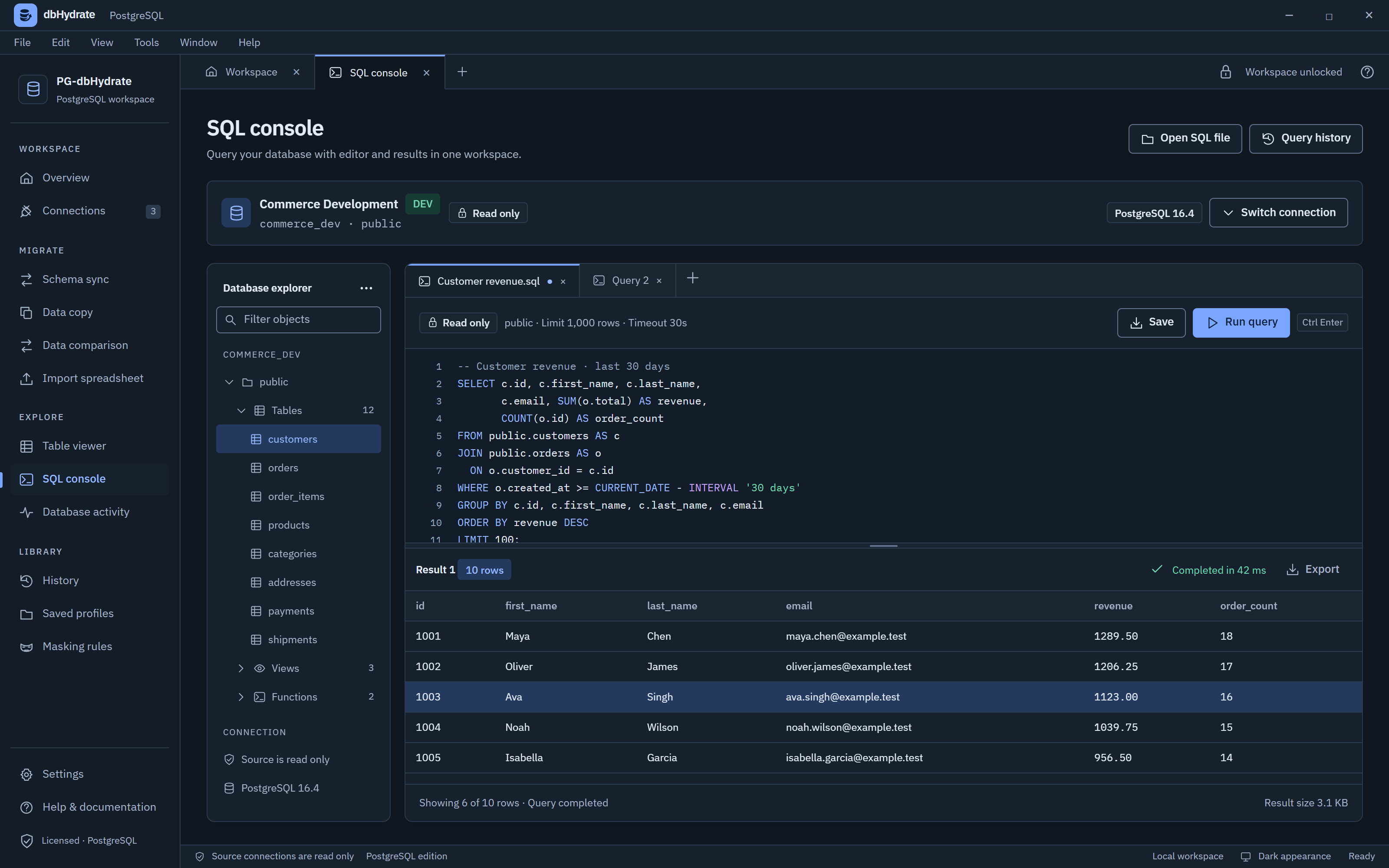
 PostgreSQL 13–17