 dbHydrate
Refresh selected data
Choose tables and rows, include the relations you need, and inspect masking and overrides.
Explore the refresh workflow MySQL-dbHydrateMySQL 8.0 / 8.4 LTS
Compare schemas. Rehearse on a shadow target and review a recovery plan for DDL that commits step by step.
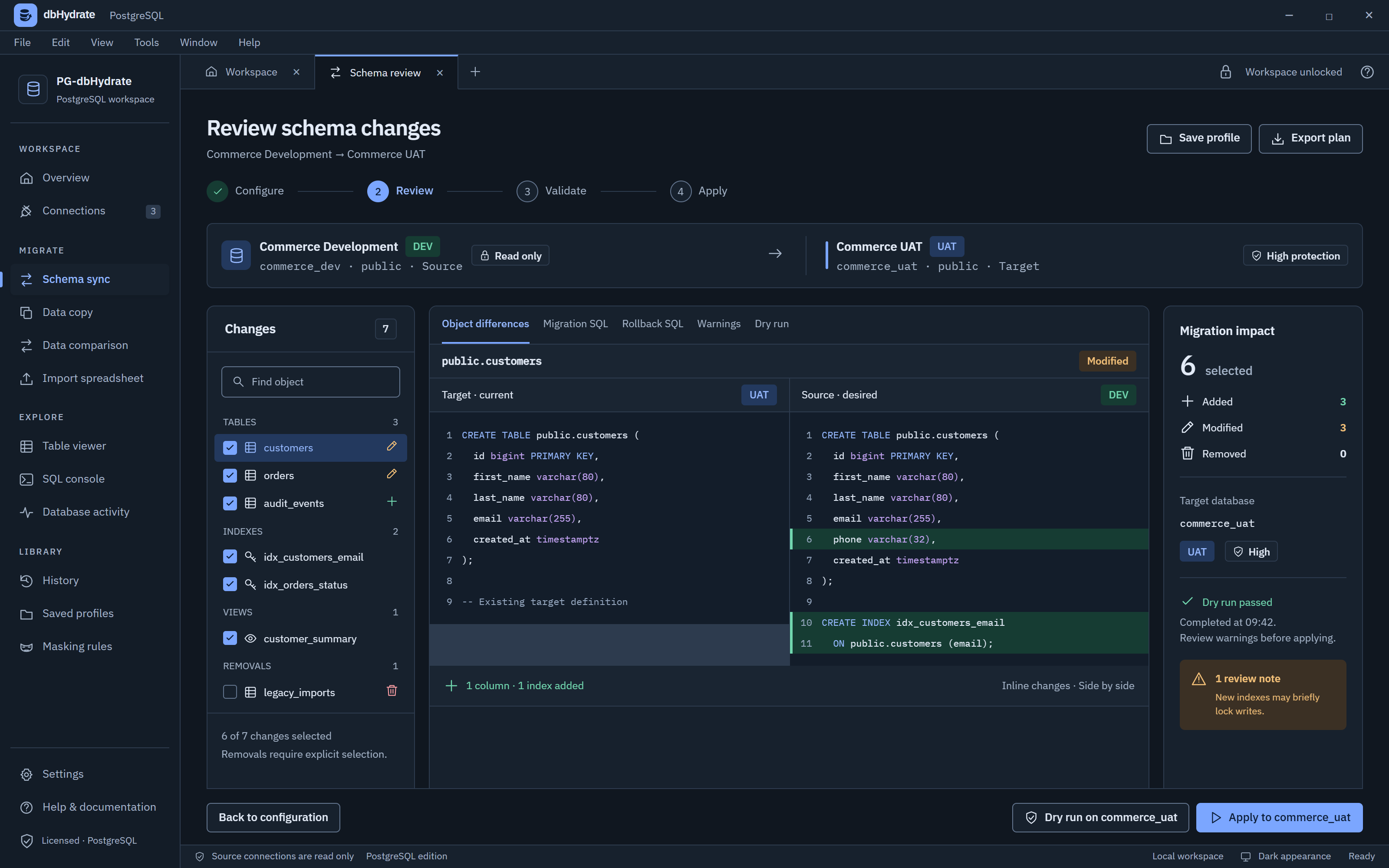
Select differences, inspect SQL, and rehearse a change before applying it.
Choose the objects to review.
Read the generated SQL side by side.
Check warnings and rehearse the plan.
THE CHANGE, IN CONTEXT
Keep the source, target and decisions together. Select the differences you want to include before applying them.
CREATE TABLE customers (
  id bigint PRIMARY KEY,
  first_name varchar(80),
  email varchar(255)
);CREATE TABLE customers (
id bigint PRIMARY KEY,
first_name varchar(80),
email varchar(255),
phone varchar(32)
);+ One reviewed column
Illustrative definitions. Review the actual plan for your database.
Rehearse on a shadow target. MySQL DDL can commit statement by statement; review recovery SQL and backups before applying.
Choose tables and rows, include the relations you need, and inspect masking and overrides.
Explore the refresh workflowCreate users, update accounts, and add or remove database access. Review engine-specific roles and permissions before applying.
View the access workspaceMySQL commits DDL statement by statement. dbhydrate never makes false promises about automatic rollback. Instead, it gives you shadow dry runs and reviewed rollback scripts.
Before modifying production, rehearse changes against a shadow environment. dbhydrate checks the DDL sequence and schema dependencies on the shadow target. Review live target permissions, locks, data volume and workload conditions separately.
ALTER TABLE shop.orders ADD COLUMN status varchar(32) NOT NULL DEFAULT 'pending';Because MySQL cannot undo committed DDL statements automatically, dbhydrate creates a reverse SQL script for every run. You can inspect the exact reverse DDL statements alongside your forward plan before applying changes.
ALTER TABLE shop.orders DROP COLUMN status;Promote only what you intend. Select individual tables, columns, secondary indexes, foreign keys, views, and stored routines. View color-coded DDL diffs highlighting added, modified, or omitted objects.
- ENGINE=InnoDB DEFAULT CHARSET=latin1+ ENGINE=InnoDB DEFAULT CHARSET=utf8mb4 COLLATE=utf8mb4_0900_ai_ciCopy test datasets between MySQL instances. Use custom WHERE conditions and row limits. dbhydrate copies rows in dependency order and transforms PII in local memory with deterministic replacements before inserting.
WHERE shop.orders.status = 'shipped' LIMIT 500;Simulate schema divergences in real time. Add or modify columns, switch database engines, and inspect the verified, dependency-ordered DDL synchronization script.
| Column | Data Type | Status | |
|---|---|---|---|
idPK | bigint | ||
customer_idFK | bigint | ||
created_at | timestamp with time zone | ||
status | varchar(32) | ||
metadata | jsonb |
-- dbhydrate generated PostgreSQL synchronization plan
-- Protection tier: Safe Transactional DDL
BEGIN;

ALTER TABLE app.orders
  ADD COLUMN status varchar(32) DEFAULT 'pending' NOT NULL;
ALTER TABLE app.orders
  ADD COLUMN metadata jsonb;

-- Create index on added column
CREATE INDEX idx_app_orders_status
  ON app.orders (status);

COMMIT;
-- End of PostgreSQL transactional execution phasedbhydrate is designed for MySQL 8.0 and MySQL 8.4 LTS. It supports self-hosted MySQL servers on Linux, Windows, and Docker, as well as managed cloud instances including Amazon RDS for MySQL, Amazon Aurora MySQL, Google Cloud SQL for MySQL, Microsoft Azure Database for MySQL, and PlanetScale. Note: MariaDB and legacy MySQL 5.7 are outside the current documented scope.
In MySQL, Data Definition Language (DDL) statements execute with implicit commits—meaning each CREATE, ALTER, or DROP statement commits immediately to the storage engine and cannot be rolled back inside a SQL transaction. While some tools make vague promises of automatic rollback, dbhydrate is honest: it uses shadow dry runs to test DDL execution beforehand and generates reviewed rollback SQL scripts for manual recovery.
A shadow dry run applies your planned DDL statements against an isolated shadow schema or staging database instance before touching production. This verifies syntax, column defaults, constraint dependencies, and collation compatibility without risking production table locks or partial schema failure.
dbhydrate inspects both table-level and column-level character sets and collations (such as utf8mb4_0900_ai_ci). Differences between source and target are flagged during comparison so you can ensure collation compatibility before applying changes.
14-day trial · Starts when you register in the desktop app. Each purchased seat allows 1 device(s).